






















Backrooms: Exit Protocol 0
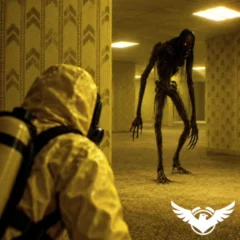
Backrooms: Exit Protocol 0 is a first-person survival horror game by VSG Enterprise. Your escape from Level 0 depends on finding a keycard and solving puzzles while a monster occupies the same maze. Search the yellow-walled rooms, interact with objects, and keep track of the route you will need to retrace.
Start by learning three inputs: movement, interaction, and running. You need to be able to inspect a possible clue without fumbling for the escape controls when the monster interrupts.
What should you be looking for?
The keycard is an objective, not a complete walkthrough. You still need to investigate the puzzles between you and the exit. Treat a blocked route as something to remember and revisit, rather than assuming every corridor should immediately lead forward.
A useful search note can be as short as “unresolved puzzle after the last junction.” Give each unfinished task a location. That makes a later discovery easier to connect to something you have already seen.
Controls: desktop and touchscreen
| Action | Computer | Mobile |
|---|---|---|
| Move | WASD or arrow keys | Joystick |
| Jump | Space | Jump button |
| Run | Shift | Run button |
| Crouch | C | Crouch button |
| Interact | E | Button marked E |
| Drop an item | R | Drop button |
| Open menu | Tab | Top-right menu button |
| Inspect the view | Right mouse button to zoom | Right side of screen to turn the camera |
If you are stuck, separate these three problems
You cannot find a new route
Return to a junction you recognize and choose one branch to investigate. Repeatedly changing direction makes it harder to tell an unexplored passage from one you have just checked.
You found something but do not know what to do with it
Reconsider the unresolved objects or puzzles on your route. Use the interaction control where the game prompts you. Before dropping anything, note where you are leaving it; R drops an item rather than opening a bag.
The monster interrupts your search
Deal with getting away before trying to finish the puzzle. Once you can resume searching, return to the last task you understood. The published objective is to avoid the monster, so do not assume a close encounter is an opportunity to attack.
Backrooms: Exit Protocol 0 FAQ
What is the goal?
Escape Level 0 by finding the keycard and solving puzzles without being caught by the monster.
How do I pick up or use objects?
Press E on a computer or tap the E button on a phone. Check any prompt shown beside the object.
How do I drop an item?
Use R on desktop or the Drop button on mobile. Check your surroundings before leaving it behind.
Can I play on a phone?
Yes. Use the joystick to move, turn the camera on the right side of the screen, and tap the action buttons.
What does the right mouse button do?
It zooms the camera. Do not confuse it with E, which handles interaction.
Where is the keycard?
This guide does not establish a verified keycard location. Search the level and follow the game’s clues rather than relying on a location from another Backrooms game.
The way out requires more than covering distance. Remember what you have searched, keep unfinished puzzles tied to recognizable locations, and give yourself a clear next task after every interruption.